
How do I apply a Discount or Coupon Code to my Order?Updated 3 months ago
If you have a coupon code for your order, be sure to apply it during checkout!
We want you to always get the best price, so let us show you where to apply your coupon code!
How to Apply a Coupon Code, Gift Card, or Discount to your Order:
- Ensure you are on the checkout page where you enter your details prior to finalizing the purchase.
- Underneath the last item in your cart will be a box that says "Discount code or gift card" as pictured below
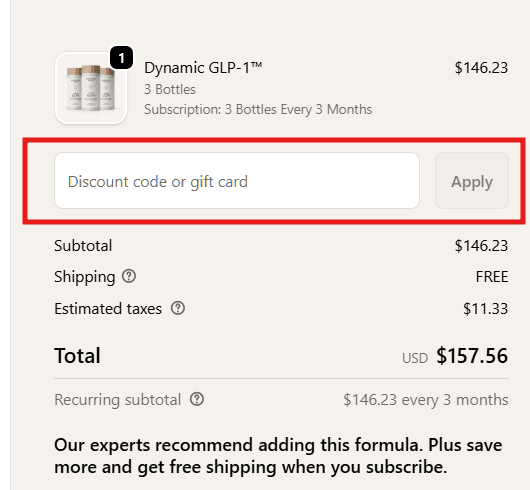
- Enter the coupon code in the box, and hit the grey "Apply" button on the right.
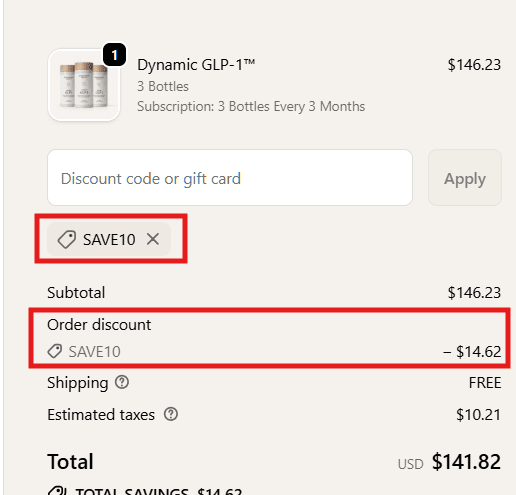
- The cart will update. You will see the coupon code listed as an "Order discount" and the discount amount will be displayed.
 Please note not all items may qualify for coupons and discounts. If you have questions about a particular promotion or discount code, view the terms and conditions on our website or call our customer service team at (800) 930-5965 for details.
I placed an order and forgot to enter my coupon code! What do I do now?
Not to worry! Simply contact our friendly customer service team via email ([email protected]), text (949 674-0920), telephone (800 930-5965) or live chat on our website. Be sure to have your order number and the email associated with the order handy.
Our customer support team will verify if your order is eligible for the promotion and assist you in applying the discount to your order. If your payment was already charged, the discount will be applied as a refund back to your account, otherwise it will be applied as a credit towards the purchase.
I am an existing subscriber - can I apply a discount code on my subscription?
Yes! At Stonehenge Health, we believe in rewarding our customers' loyalty and always allowing you to have the best price we offer!
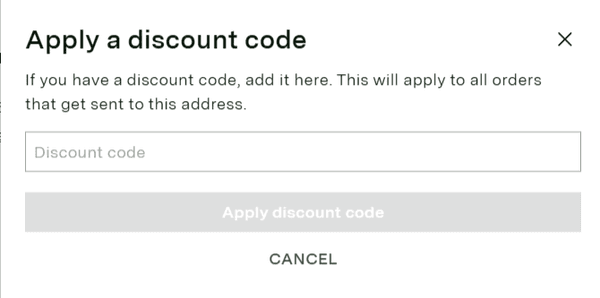
You can add a discount code to your existing subscription easily by visiting Your Subscriptions. In the center of the page, directly beneath the "Send now" button, the products and price for your next subscription order are listed. Underneath the final product will be an "Add discount" link.

Once you click on that link, a box will pop up that allows you type in a discount code to apply to the subscription. Once you type in the code, the "Apply discount code" button will light up blue. Simply click on it, and if it is a valid promotion code it will apply to your subscription!
Please note that our discounts and sales have limitations on how many subscription shipments they will apply for, which may vary. Check the promotion details if you have any questions about how many future shipments the discount will apply for.
Important Note: The discount will automatically apply to each future subscription order it is eligible for, even if the order is scheduled after the promotion period ends! You can keep your normal subscription frequency and do not need to process the next order early to take advantage of the promotional pricing.