
How do I cancel or modify my subscription?Updated 3 months ago
All subscription orders will receive a pre-shipment email 5 days prior to your renewal order being processed. If you signed up for text notifications, you will also receive a text 5 days prior to your renewal. This is to allow you time to cancel or modify your upcoming shipment.
Modify Your Subscription: If you would like to change your subscription billing address, shipping address, payment card information, or next delivery date, please log in to Your Subscriptions. Our premier subscription service enables you to modify your subscribed products, view upcoming orders, process your next shipment early, skip or delay your next shipment, update payment details or addresses, and more, all on our easy-to-use and convenient online platform.
Cancel Your Subscription: To cancel your automatic subscription orders and stop receiving new shipments, log in to Your Subscriptions
Here, you will find a record of all active subscriptions associated with your account. Click the "Manage Subscription" link underneath the subscription you wish to cancel.
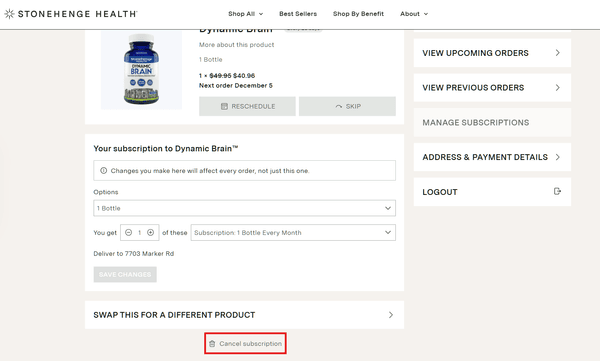
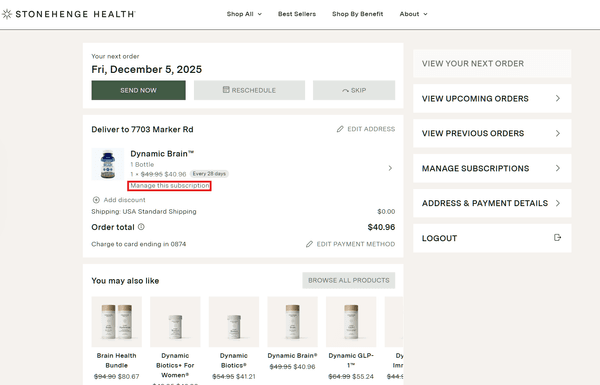 Finally, click on the "Cancel Subscription" link at the bottom of the page, answer a couple of quick questions, and your subscription will be canceled. You can reactivate it at any time you wish to begin receiving it again in the future.
 If you prefer, we can also assist you in canceling or modifying your subscription by contacting us.
Need help?
If you still have questions about your subscription or need managing it, please contact us and we will be happy to assist you.
Call us at 1-800-930-5965
Text us at 1-949-674-0920
Email us at [email protected]
Live Chat: Click here to chat with us